

Baze Windows Update Disabler is a simple tool for Windows 11 and Windows 10 that blocks Windows updates until you enable them again with the same tool.
Click “Disable Windows Updates” and close the program. Windows updates will remain blocked, even after restarting your computer. Updates will only be allowed again when you open the tool and click “Enable Windows Updates”.
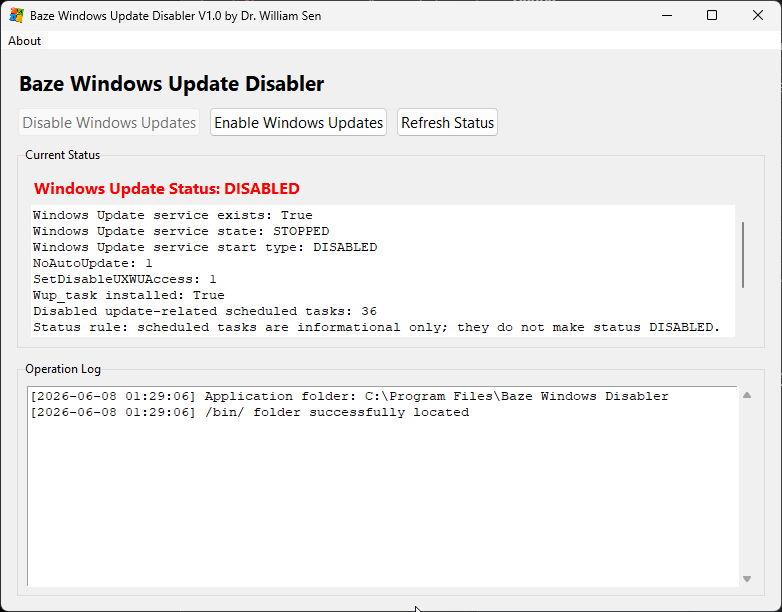
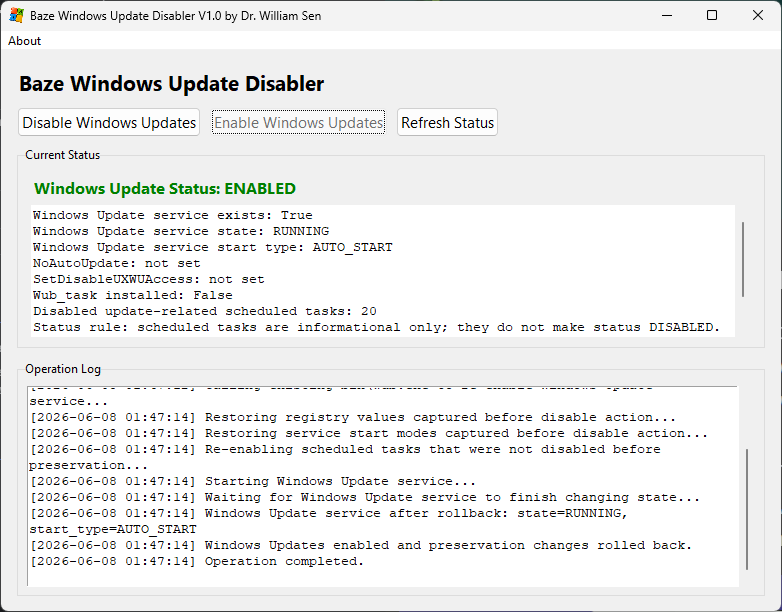
Current Version: V1.0
Author: Dr. William Sen
Last Updated: June 8, 2026
Compatibility tested with: Windows 11, Windows 10
Baze Windows Update Disabler prevents Windows updates by applying several system-level changes that block Windows from automatically checking for, downloading, installing, or restoring updates.
When the tool is used to disable Windows updates, it first records the current Windows Update configuration. This includes the current status of update-related services, registry settings, and scheduled tasks. This saved state allows the tool to restore the previous configuration later if Windows updates are enabled again.
The tool then applies Windows Update policy settings in the Windows registry. These policies tell Windows not to perform automatic updates and restrict access to the Windows Update interface in Windows Settings. This helps prevent Windows from starting the normal automatic update process through its built-in update controls.
In addition to the registry changes, the tool uses the included wub.exe file from the /bin/ folder. This helper program disables and protects the Windows Update service so Windows cannot easily turn it back on by itself. The tool also stops several Windows services that are commonly involved in the update process, including Windows Update Service, Update Orchestrator Service, Delivery Optimization, Background Intelligent Transfer Service, and Windows Update Medic Service. Where Windows allows it, these services are also configured so they do not start automatically.
The tool also disables Windows scheduled tasks related to Windows Update, Update Orchestrator, Windows Update Medic, Remediation, and Install Service. These scheduled tasks are often used by Windows to check for updates, repair update components, or restart update services after they have been disabled. By disabling these tasks, the tool blocks that Windows will silently reactivate the update system later.
Finally, the tool creates its own preservation task using the included Wub_task.vbs file. This task helps maintain the disabled update state if Windows attempts to reverse the changes. Together, the registry policies, disabled services, disabled scheduled tasks, and protection task create a layered block against automatic Windows updates.
When Windows updates are enabled again through the tool, the tool removes its preservation task, calls wub.exe to re-enable Windows Update, restores the previous registry settings, restores the previous service startup modes, and re-enables scheduled tasks that were active before the disable operation. This allows the tool to roll back its changes instead of simply forcing a generic Windows Update configuration.
Baze Windows Update Disabler includes wub.exe (Windows Update Blocker by Sordum), but it does not rely on it alone. The reason is that Windows Update is not controlled by a single switch. Windows uses several services, scheduled tasks, policy settings, and repair mechanisms to keep the update system active. If only one part is disabled, Windows may later restart services, repair update components, or restore update behavior through scheduled maintenance.
The included wub.exe file is used as an important helper because it can disable and protect the Windows Update service. However, Baze Windows Update Disabler adds additional safeguards around it. The tool also applies Windows Update policy settings in the registry, disables update-related scheduled tasks, stops several update-related services, and creates its own preservation task to help maintain the disabled state.
Another important difference is rollback. Before disabling updates, Baze Windows Update Disabler records the current system configuration, including service states, registry values, and scheduled tasks. When updates are enabled again, the tool can restore the previous configuration instead of simply turning Windows Update back on without knowing what the system looked like before.
In other words, wub.exe handles part of the job, while Baze Windows Update Disabler turns it into a more complete Windows Update control tool. It provides a user interface, status checking, logging, stronger multi-layer blocking, and a cleaner way to undo the changes later.
Baze Windows Update Disabler includes wub.exe (Windows Update Blocker by Sordum), but it does not rely on it alone. The reason is that Windows Update is not controlled by a single switch. Windows uses several services, scheduled tasks, policy settings, and repair mechanisms to keep the update system active. If only one part is disabled, Windows may later restart services, repair update components, or restore update behavior through scheduled maintenance.
The included wub.exe file is used as an important helper because it can disable and protect the Windows Update service. However, Baze Windows Update Disabler adds additional safeguards around it. The tool also applies Windows Update policy settings in the registry, disables update-related scheduled tasks, stops several update-related services, and creates its own preservation task to help maintain the disabled state.
Another important difference is rollback. Before disabling updates, Baze Windows Update Disabler records the current system configuration, including service states, registry values, and scheduled tasks. When updates are enabled again, the tool can restore the previous configuration instead of simply turning Windows Update back on without knowing what the system looked like before.
In other words, wub.exe handles part of the job, while Baze Windows Update Disabler turns it into a more complete Windows Update control tool. It provides a user interface, status checking, logging, stronger multi-layer blocking, and a cleaner way to undo the changes later.
Years ago, I was unable to fully disable Windows updates. At the time, this was mainly an issue with Windows 10. I found a great tool called Sledgehammer, which handled the job quite well. However, the user experience was not great, it was mostly suited for experienced users. Also, uninstalling and enabling Windows updates again was kind of difficult with Sledgehammer.
After Sledgehammer stopped being actively updated, and Windows 11 made disabling updates even more difficult, I decided to create my own tool.
I first researched what Windows actually does to make update blocking so difficult. The built-in settings do not allow updates to be disabled permanently, and the process is not controlled by a single service such as “Windows Update”. There are many services, scheduled tasks, and system components involved.
I enjoy a good challenge, and I especially do not like being told by Microsoft what I can or cannot do with my own system. So one Sunday, I decided it was time to build a better solution. That is how my Windows Update Blocker was born, and I called it “Baze Windows Update Disabler”, because many users ask the question: “How to disable Windows updates”.
It’s obvious now: Using the Baze Windows Update Disabler, lol.
It is free, so enjoy.