

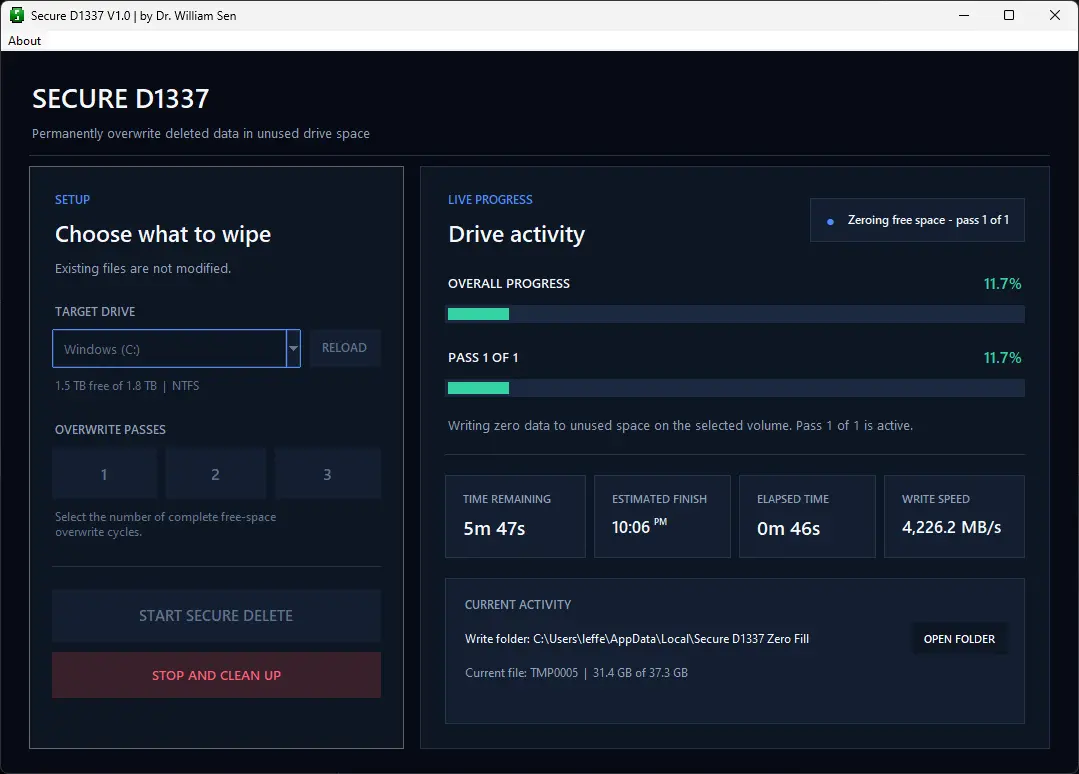
This Windows secure delete tool provides functionality commonly associated with sdelete and secure erase software for Windows. It helps users secure erase files and permanently remove deleted data from a computer so it cannot be recovered.
When you delete a file from a hard drive, USB flash drive, SD card, or other storage device, the data may still remain physically on the device even though it is no longer visible. Because of this, file-recovery and undelete tools may be able to restore it.
Secure D1337, or Secure Delete, wipes the free space containing deleted data so those files can no longer be recovered. It does not delete or modify your existing files or folders. You can safely run it on a drive that is still in use, including the C:\ drive. The tool only processes space associated with previously deleted files.
Your existing files and folders will appear unchanged after the process. However, previously deleted data will no longer be recoverable with standard undelete tools.
This is especially useful before selling or giving away a laptop, computer, flash drive, or other storage device. It helps prevent someone from recovering personal files you deleted in the past. You can also run the tool periodically to make sure deleted files remain permanently deleted.
Current Version: V1.0
Author: Dr. William Sen
Last Updated: July 20, 2026
Compatibility tested with: Windows 11, Windows 10
If you abort, secure D1337 will also automatically remove the temporary files for you, so they are no residues left.
There are many zero-delete, drive-cleaning, and secure-erasure tools, zero cleaner etc. available. Most of them do the same basic job: overwrite free space so deleted files cannot be recovered.
The problem was finding one that was simple, and actually easy to download. Some tools were unclear about whether they were free. Others came with installers, bundled software, or unnecessary extras. Some download pages were confusing, and others no longer worked at all.
I wanted to remove that frustration.
Secure D1337 was created as a straightforward tool that does exactly what it is supposed to do. There is no installation process and no bloatware. Download the executable, open it, select the drive, and run it.
There are many zero-delete, drive-cleaning, and secure-erasure tools, zero cleaner etc. available. Most of them do the same basic job: overwrite free space so deleted files cannot be recovered.
The problem was finding one that was simple, and actually easy to download. Some tools were unclear about whether they were free. Others came with installers, bundled software, or unnecessary extras. Some download pages were confusing, and others no longer worked at all.
I wanted to remove that frustration.
Secure D1337 was created as a straightforward tool that does exactly what it is supposed to do. There is no installation process and no bloatware. Download the executable, open it, select the drive, and run it.
The name D1337 is a stylized version of the word “Delete.”
The acronym “1337” comes from leetspeak, in which numbers replace letters. In leetspeak, “1337” is read as “leet,” short for “elite.”
In leeetspeech:
D1337 therefore means “Delete”, hence Secure D1337 means “Secure Delete”.
I chose the name because I was part of “The Scene,” a hacker and computer subculture that emerged in the mid-1980s. I was an active member until the late 1990s.
Some people say that nobody ever truly leaves The Scene. Once you are part of it, you remain connected for life. That may be true. Even after nearly 35 years, people in some of the remaining chat groups still recognize my old handle and remember the group I belonged to during the 1990s. I usually get instant access after a short security checkup from today’s group members such as “provide the name of a famous trsi hq /X bbs”. Which of course I would know immediately where others wouldn’t even understand what the question means.
The Scene remains active in 2026, with an international community estimated to include more than 20,000 members.
D1337 reflects that history. Leetspeak is associated with The Scene and early computer culture, replacing letters with similar-looking numbers. The “1337” in D1337 is therefore a reference to those roots and to the community that shaped an important part of my early computing experience.